Posts

official coding stated

This week the official coding started. An monday Philip and I had a little chat on how I should proceed from now. The first thing is to integrate the prototype on which I worked on in the pre-coding time into Picard itself. Therefor I brached Picard on lauchpad. So feel free to check out my working copy of picard . Just keep in mind that you will also need the latest version of Mutagene to run picard's trunk. (Ubuntu folks go here )

Wizard: File handling setup

Image
So, being back from London (was really cool meeting all those people) I started coding. I decided to start with the first run settings wizard that basically sets up the things that are accessible from the settings dialog too. Additional I'm trying to make the file naming easier by providing an overview of the existing scripting variables taken from the wiki . Here comes up a question I'm just think about: Should I save the description in a local plaintext file or should it be pulled from the wikipage? The second option would be nice on the one hand as the wikipage is easy to extend by non-coders, but everything could also break more easily, too, e.g. by changing the formating. Another idea that might be interesting to put on my schedule is the posibility of downloading and installing plugins available for picard but not included for e.g. legal reason using the wizard.

Diving into pyQt

I started learning pyQt and as far as I can tell I'm quite happy with my book. While I didn't have this big expectations on the book reading it is a quite a joy. The author starts by introducing python itself, but in a way also interesting to people experienced with python. Of course there are mentioned all the basic concepts in python but also some less known topics like things that are new in python 2.5 and even 2.6. So now I'm at the point of general principles on hand-coded dialog layout and the signal and slot concept. While having learned pyGtk and wxWidgets more from reading the reference it is really nice having everything introduced by well explained code examples.

timeplan update

Here is the updated time plan for the PicardQt Wizard: Total duration (Week numbers): 21 - 33 Layout: 21, 22 Sample Application: 23 - 27 mid term Evaluation Real Application: 28 - 32 Cleanup and other things: 33 ps: please someone write a gantt chart widget!

Starting up...

Image
I finally decided to buy the book " Rapid GUI Programming with Python and QT. The Definitive Guide to PyQt Programming" by Mark Summerfield. Actually there are not many choices if you're looking for something up to date. Thinking on what might be the best way to introduce the user to Picard it came to my mind, that I maybe should choose a more visual way based around screen shots. I came to this conclusion while looking at myself always clicking away these more annoying than helpful "Tip of the day" dialog boxes when starting for example GIMP. But I will see how this could fit together when starting with the actual dialog outline while practicing some pyQt.

Accepted for SoC 2008

Hi, I finally got accepted for Google's Summer of Code 2008 . One interesting thing is, that I my semester are two more SoC participants, so the University of Regensburg probably has one of the highest rate of participants at all. For SoC I plan to update my blog about once a week, to allow people to keep track of my progress on creating "A Wizard for PicardQt". PicardQt is a quite innovative mp3 tagger using the Musicbrainz database run by the Metabrainz foundation. From the software side it is written in python and using Qt I really would recommend it to everyone who would like to have a clean and structured music collection. The purpose of the Wizard is, in short, helping new users to set up PicardQt correctly and provide help on further steps after. So having mentioned Qt, this will be my first investment in the project: Buying a book on Qt. As I did stuff with wxWidgets and Gtk using the reference was ok, but a book is simply more comfortable if you don't have...

OpenDNS Fritzbox Howto

While I did some research on how getting this to work I saw many people trying this without success. Here is the definitive guide on how you use OpenDNS with your Fritzbox: Make sure your firmware is up-to-date Enable telnet Login over telnet and type "cd /var/flash/", "nvi ar7.cfg" Search for overwritedns1 and overwritedns2 (they appear two times each) using the "/" key and "n" (next search result). Press "i" to get into edit mode and enter the opendns server as noted in the opendns linux guide ESC brings you back to command mode. ":w" saves the file and ":q" closes the editor again. type "reboot" to restart the fritzbox Restart you networking and you browser. The OpenDNS Site now should tell you that you are using OpenDNS already. Now you can create an account, set it to dynamic DNS, add network and login to dnsomatic. Now login to fritz.box using your browser and enter the following dynamic DNS settings...

Workshop Project: Hot Wire Anemometer

Image
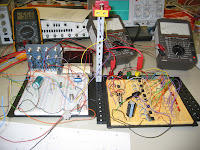
I just want to present my project I built as an own project in the electronics workshop hold at my university, that really has been quite interesting. Its a so called "Hot Wire Anemometer" (Airflow-meter). Here you have the explanation as an excerpt of the project documentation: Die Idee beim Hitzdrahtanemometer ist den Wärmeverlust an einem Glühfaden zu bestimmen und dadurch auf die Geschwindigkeit des kühlenden Luftstroms zu schließen. Um den Wärmeverlust messen zu können wird die Widerstand – Temperatur Abhängigkeit des Glühdraht benutzt um diesen auf einer konstanten Temperatur also Widerstand zu halten. Schließlich wird der dazu notwendige Strom, bzw der Spannungsabfall am Glühdraht gemessen, verstärkt und ausgewertet. Although we had a bunch of problems in the end everything worked very well and was a nice combination on analog and digital elements. As a hot wire we used a 6V light bulb where we took off the glass.

pyfmgraph

Image
I just wanted to mention my latest work also in this place. It's called pyfmgraph and it's a visualization on listening customs using the data collected by last.fm . I need to mention that this is actually not my idea. If seen this before on http://megamu.com/lastfm/ but since this guy didn't reply on my email I decided doing this by myself. While first looking for a convenient program for this task I found none and decided creating my own using Python . The biggest problem actually was smoothing the curves to have something nice looking. I decided using bezier curves as they are easy to implement and look good. Now the thickness of each colorstream represents the listening frequency at the time which represents the x axis. Furthermore the colors fade from blue tones to red tones which represents the time the artist has been listened for the first time. Blue means earlier while red references to a later time. My current work on the pyfmgraph focuses on implementing vector...

My new python project

Image
Just wanted to mention that I have a new project I'm working on. It's called vortextanks because the player should once be able control some kind of tank and fire simple ballistics like in the game Worm. The special thing however is that the ballistics are influenced by an arbitrary shaped force field. So it like a battle happening between two planets. In the picture you can see the gradient map used to calculate the force on the projectile.

Update

So, in general a very long time since my last post. If I think back to the time when I have written the last post, it's like thinking at another live. I started studying physics. I hope I'll finish it also.

cacti and friends

Image
The last days I spent some time installing digitemp sensors on my watercooling system and setting up cacti to graph the temperatures. For reading the sensors I use this little python script: from subprocess import Popen, PIPE, STDOUT from string import * from sys import * process = Popen("digitemp_DS9097 -q -c /etc/digitemp.conf -r2000 -a", shell=True, stdout=PIPE, stderr=STDOUT) identifiers = argv[1:] identifiers = map(lambda x: x+":",identifiers) n = len(identifiers) values = [.0]*n valuecount = 0 for line in process.stdout: line = line.split() values[valuecount] = line[6] valuecount += 1 output = "" for i,j in zip(identifiers,values): j = str(j) output += (i+j+" ") print output It is called by cacti using python /scripts/check_digitemp.py cool air hot out The parameters given to the script are simply labels of your choice. Just make shure they fit the number of sensors installed. Also make sure /etc/digitemp.conf exists and the cacti use...

proftpd and xinetd

The aim of xinetd is providing services that don't consume ressource if they are not used. So this is perfect for my ftp server because most time the server isn't used. xinetd listens on port 21 and it someone connects to this port it starts an instance of proftpd and passes an connection to the instance: sonium@raumstation:~$ cat /etc/xinetd.d/proftpd service ftp { disable = no flags = REUSE socket_type = stream wait = no user = root server = /usr/sbin/proftpd log_type = FILE /var/log/xinetd.log log_on_success += DURATION USERID log_on_failure += USERID nice = 10 #bind = [IP to bind to] } even proftpd must be configured to work with xinetd: sonium@raumstation:~$ cat /etc/proftpd.conf ServerName "Debian" ServerType inetd # I'm behind a firewall, port 21 and 60000-60200 are forwared to my ip # myserver.dyndns.org points to my external IP MasqueradeAddress myserver.dyndns.org PassivePorts 60000 60200 # Set the user and group that the server normally runs at. User ft...

set order of alsa devices

Again this is primarly a note to myself. I have a onboard PCI and an USB soundcard. This is how I set the order of the devices: sonium@raumstation:~$ cat /etc/modprobe.d/alsa-base alias snd-card-0 snd-usb-audio alias snd-card-1 snd-intel8x0 options snd cards_limit=2 options snd-usb-audio index=0 vid=0x0763 pid=0x200f # change v(endro)id und p(roduct)id according to the output of lsusb options snd-intel8x0 index=1 # --snip-- sonium@raumstation:~$ cat /etc/modules snd-usb-audio #--snip-- Now hw(0,0) points to the usb card and hw(1,0) to the PCI card.

guitar rig 2 with linux

Image
I just got Guitar Rig 2 running on my linux box. It took me a long time. So here is some information how I did it. I'm using the ubuntu-package from winehq for wine. Then you need fst (I'm using fst-1.8). FST again needs Jack, Wine and lash to compile. And lash needs the uuid-dev package found in the ubuntu repository. But the really hard part is to find the Steinberg VST-SDK. The point is that fst-1.8 needs vstsdk.2.3.zip to compile not 2.4. If you are lucky you can google it up. If not drop me an email (sonium at gmail dot com). After everything is compiled you should be able to run Guitar Rig 2. It's a bit buggy so if nothing shows up, just kill the process and try again. It took me a few tries but it just seems to be a matter of patience till it works.

lvm + reiserfs

As I have reiserfs on a lvm system I often need to resize partitions. This is just a personal note on how to do this: sudo lvextend -L 2G /dev/vg0/var sudo resize_reiserfs -s +1G /dev/mapper/vg0-var

Last.fm

If you look on the right top corner you will see, that I just discovered Last.fm It is like pandora a community based aproach of getting known to new music. For that job it has quite a lot of media player plugins even for several linux players. My current player, gmusicbrowser, has the plugin by default.

digitemp and cacti

So, I write this post on english, because there is rare information about and I like to make it available for non-german speakers too. I switched completly to linux now and have build a outdoor thermometer using a dallas 1-Wire sensor with a home made serial adapter. Here are schematics and how to build the adapter. There is a debian-package of digitemp, the tool that reads the data from the sensors. It contains three binaries from wich only digitemp_DS9097 works with the RS232 interface. First of all you need to initialize it by doing: sonium@ubuntu:~$ digitemp_DS9097 -s/dev/ttyS0 -i DigiTemp v3.3.2 Copyright 1996-2004 by Brian C. Lane GNU Public License v2.0 - http://www.brianlane.com Turning off all DS2409 Couplers . Searching the 1-Wire LAN 105734DB00080028 : DS1820/DS18S20/DS1920 Temperature Sensor ROM #0 : 105734DB00080028 Wrote .digitemprc now you should be able to receive the temperature by using: sonium@ubuntu:~$ digitemp_DS9097 -r1000 -a DigiTemp v3.3.2 Copyright 1996-2004 b...

the blog must go on

schon lange nichtsmehr geschrieben hier. Also wird mal wieder Zeit. Meine momentane Beschäftigung ist immer noch Python (neben Guildwars). Dive into Python scheint wirklich gut zu sein, jedenfalls kann ich jetzt Regular Expressions ein bischen und schlag mit im Moment mit Unittest rum ohne dabei wirklich Produktiv zu sein. Langfristig gesehen möchte ich mit Twisted einen DirectConnect Server basteln. Außerdem hab ich beschlossen nach dem Zivi nach Indien zu fahren, muss mir aber noch einen Reisepartner finden. Das halt ich erst mal für das schwierigste Problem. In meinem direkten Freundeskreis schätze ich nicht, dass sich jemand findet. Evlt mal im Internet nach gleichgesinnten suchen. Also wer mit will, einfach fragen :D

Pythonisches

Image
So, endliche funktioniert er, mein Curve-Editor. Eigentlich ist das Teil dem Gtk.Curve Widget ziemlich ähnlich. Der Nachteil des GTK-Widgets war allerdings, dass man sich nur eine Punktemenge der Curve zurückgeben lassen konnte. Hier bekommt man die Koeffizienten des erzeugten Graphen. Nebenbei habe ich noch gelernt, dass man mit Numarray auch lineare Gleichungssysteme lösen kann (hier um die Funktion aus den Punkten zu ermitteln). Das ganze ist ein Teil eines Projekts, über das ich aber jetzt noch nichts verraten möchte, außer ,dass es "Eden".